Skip to content
  • Products
    • SecuX V20
    • SecuX W20
    • SecuX W20 TrendMicro
    • SecuX W10
    • SecuX Nifty
    • X-SEED Series
    • Compare Wallets
    • Bundle
    • View Shop
  • News & Blog
    • News & Blog
    • Media Reviews
  • For Business
    • About
    • Affiliate Program
    • Payment Solution
    • Partnerships
  • Support
    • How It Works
    • Contact Us
    • Crypto Assets

Connect WalletShop

  • Products
    • SecuX V20
    • SecuX W20
    • SecuX W20 TrendMicro
    • SecuX W10
    • SecuX Nifty
    • X-SEED Series
    • Compare Wallets
    • Bundle
    • View Shop
  • News & Blog
    • News & Blog
    • Media Reviews
  • For Business
    • About
    • Affiliate Program
    • Payment Solution
    • Partnerships
  • Support
    • How It Works
    • Contact Us
    • Crypto Assets
  • Connect Wallet
  • Shop
  • Products
    • SecuX V20
    • SecuX W20
    • SecuX W20 TrendMicro
    • SecuX W10
    • SecuX Nifty
    • X-SEED Series
    • Compare Wallets
    • Bundle
    • View Shop
  • News & Blog
    • News & Blog
    • Media Reviews
  • For Business
    • About
    • Affiliate Program
    • Payment Solution
    • Partnerships
  • Support
    • How It Works
    • Contact Us
    • Crypto Assets
  • Connect Wallet
  • Shop
Popular Search sendevmv20metamaskmet

V20

  • Beginner Safety Guide (Safety and Security Information)
  • Before You Start
  • Set up a New V20 Wallet
Device Setup
  • Set up a New V20 Wallet
  • Recover an EXISTING V20 Wallet
How to Connect
  • Connect V20 to Computer via USB
  • Connect V20 to Computer via Bluetooth
  • Connect V20 to Mobile Device via Bluetooth
Send and Receive
  • Send Funds on Web
  • Send Funds on Mobile
  • Send NFTs on Web
  • Send NFTs on Mobile App
  • Manage EVM Chains
  • Ada Portal — WEB
  • Receive Funds on Web
  • Receive on Mobile
Manage Coins & Tokens
  • Add Accounts on Web
  • Add Accounts on Mobile
  • Manage ERC-20 Tokens on Web
  • Manage ERC-20 Tokens on Mobile
  • Manage BEP-20 Tokens on Web
  • Manage BEP-20 Tokens on Mobile
  • Manage TRC-10/ 20 Tokens on Web
  • Manage TRC-10/20 Tokens on Mobile
Device Functions
  • Device Functions
  • Hidden Wallet
  • Recovery Seed Phrase Check
  • Firmware Update on Web
  • Firmware Update on Mobile
DApps / Platforms
  • WalletConnect for DApps
  • Connect to MetaMask Using QR-based
  • Send or Swap Crypto Using MetaMask
  • Withdraw from Binance to SecuX on Web
  • Withdraw from Binance to SecuX on Mobile
  • Withdraw from Coinbase to SecuX on Web
  • Withdraw from Coinbase to SecuX on Mobile
  • Buy Crypto on Coinify on Web
  • Buy Crypto on Coinify on Mobile
FIO Protocol
  • Stake FIO Token
  • Register a FIO Crypto Handle
  • Send to a FIO Crypto Handle
  • Assign and Remove a FIO Crypto Handle
  • Register a FIO Domain
  • Renew a FIO Domain
  • FIO Request

W20

  • Beginner Safety Guide (Safety and Security Information)
  • Before You Start
  • Set up a New W20 Wallet
Device Setup
  • Set up a New W20 Wallet
  • Recover an EXISTING W20 Wallet
How to Connect
  • Connect W20 to Computer via USB
  • Connect W20 to Computer via Bluetooth
  • Connect W20 to Mobile Device via Bluetooth
Send and Receive
  • Send Funds on Web
  • Send Funds on Mobile
  • Send NFTs on Mobile App
  • Send NFTs on Web
  • Manage EVM Chains
  • Ada Portal — WEB
  • Receive Funds on Web
  • Receive on Mobile
Manage Coins & Tokens
  • Add Accounts on Web
  • Add Accounts on Mobile
  • Manage ERC-20 Tokens on Web
  • Manage ERC-20 Tokens on Mobile
  • Manage BEP-20 Tokens on Web
  • Manage BEP-20 Tokens on Mobile
  • Manage TRC-10/ 20 Tokens on Web
  • Manage TRC-10/20 Tokens on Mobile
Device Functions
  • Device Functions
  • Hidden Wallet
  • Recovery Seed Phrase Check
  • Firmware Update on Web
  • Firmware Update on Mobile
DApps / Platforms
  • WalletConnect for DApps
  • Connect to MetaMask Using QR-based
  • Send or Swap Crypto Using MetaMask
  • Withdraw from Binance to SecuX on Web
  • Withdraw from Binance to SecuX on Mobile
  • Withdraw from Coinbase to SecuX on Web
  • Withdraw from Coinbase to SecuX on Mobile
  • Buy Crypto on Coinify on Web
  • Buy Crypto on Coinify on Mobile
FIO Protocol
  • Stake FIO Token
  • Register a FIO Crypto Handle
  • Send to a FIO Crypto Handle
  • Assign and Remove a FIO Crypto Handle
  • Register a FIO Domain
  • Renew a FIO Domain
  • FIO Request

W10

  • Beginner Safety Guide (Safety and Security Information)
  • Before You Start
  • Set up a New W10 Wallet
Device Setup
  • Set up a New W10 Wallet
  • Recover an EXISTING W10 Wallet
How to Connect
  • Connect W10 to Computer via USB
Send and Receive
  • Send Funds on Web
  • Send NFTs on Web
  • Manage EVM Chains
  • Ada Portal — WEB
  • Receive Funds on Web
Manage Coins & Tokens
  • Add Accounts on Web
  • Manage ERC-20 Tokens on Web
  • Manage BEP-20 Tokens on Web
  • Manage TRC-10/ 20 Tokens on Web
Device Functions
  • Device Functions
  • Hidden Wallet
  • Recovery Seed Phrase Check
  • Firmware Update on Web
DApps / Platforms
  • Withdraw from Binance to SecuX on Web
  • Withdraw from Coinbase to SecuX on Web
  • Buy Crypto on Coinify on Web
FIO Protocol
  • Stake FIO Token
  • Register a FIO Crypto Handle
  • Send to a FIO Crypto Handle
  • Assign and Remove a FIO Crypto Handle
  • Register a FIO Domain
  • Renew a FIO Domain
  • FIO Request

Nifty

  • Mint MnemonicX2048 NFT
  • Safety Guide
  • Download App
  • Create a New Wallet
  • Mint MnemonicX2048 SBT
Getting Started
  • Device Setup
  • Connect Device (First Time)
  • Create a New Wallet
  • Restore Wallet With Recovery Seed
Manage Wallets
  • Connect / Disconnect Device
  • Add a New Wallet
  • Switch Wallet
  • Remove Wallet
  • Download Favorites
  • Settings
  • Edit Wallet Name
  • Change Profile Picture
  • Firmware Check
  • Support
NFTs
  • Mint MnemonicX2048 NFT
  • Send NFTs
  • Receive NFTs
  • Mint MnemonicX2048 SBT
  • Add to Favorites
  • Display NFTs on Wallet
  • View and Manage NFTs
  • Manage NFT Gallery on SecuX Wallet App
  • Hide / unhide NFTs
  • Share NFTs
Crypto
  • Send Crypto
  • Receive Crypto
  • Manage Crypto
DApps
  • WalletConnect
  • Disconnect DApp
  • Sign DApp request

XSEED Series

  • Aluminum Seed
  • Stainless-steel Seed
  • Crypto Seed Storage System

Additional Resources

  • Mint MnemonicX2048 NFT
  • Mint MnemonicX2048 SBT
  • Manage Solana (SOL) and Solana SPL tokens on SecuX V20, W20 and W10.
  • How to Store Shiba Inu Tokens in a SecuX Hardware Wallet
  • Introducing SecuX’s Steel Crypto Wallet: The ‘X-Seed’
  • How SecuX’s NFT Wallet is Absolutely Changing NFT Storage Forever
  • Home
  • How it works
  • W20
  • Device Functions
  • Device Functions

Device Functions

Table of Contents
  • Bluetooth
  • Hidden Wallet
  • Reset
  • Lock Timer
  • Name
  • PIN
  • SEED
  • About

You can access device functions from the settings menu, by pressing the menu icon in the top left corner of the device’s screen.

Device Functions

icon_bluetooth

Bluetooth #

1. Tap on the Bluetooth icon to turn on the Bluetooth function.

2. Turn on Bluetooth functions on both device and mobile phone/tablet/computer to enable pairing.

3. A 6-digit OTP (one-time-password) will be generated on screen when pairing, enter OTP on SecuXess Web App /SecuX Mobile app.

NOTE: The Bluetooth function automatically turns off after 5 minutes if pairing was not detected.

Bluetooth


icon_hidden wallet

Hidden Wallet #

1. Choose a 4-8 digit number different from the PIN you have already set up.

2. Enter a passphrase as your 25th recovery word for future recovery.

3. Once set up you can use the Hidden Wallet PIN to login instead of your device PIN and access your hidden wallet.

4. Learn more about the hidden wallet feature.

Hidden Wallet


icon_reset

Reset #

1. Reset function restores the device to its factory settings.

2. Before resetting, make sure you have your 24 recovery seed phrases and passphrase at hand, to ensure full recovery of your private key and crypto assets.

3. Once reset, all data including PIN, hidden wallet PIN, Private Key, recovery seed phrases, and all of your accounts and information will be deleted.

4. Follow the instructions on the screen to reset the device.
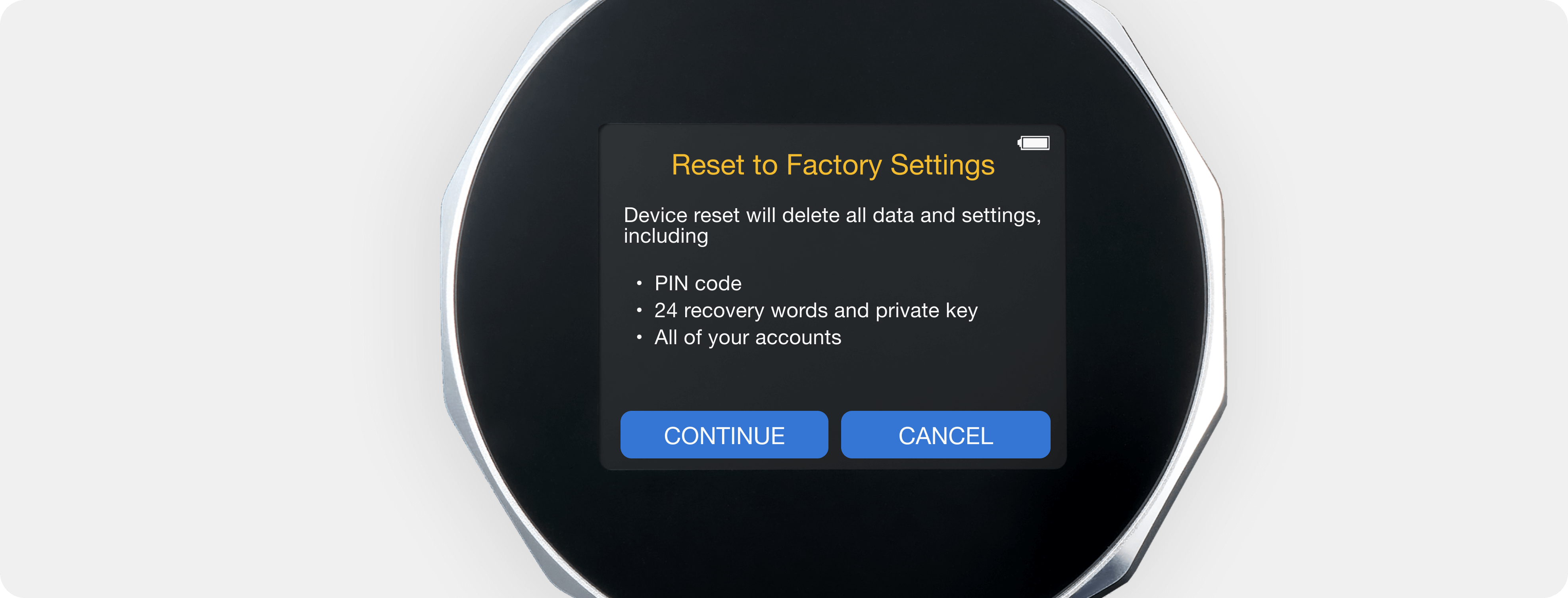
Reset


icon_Lock Timer

Lock Timer #

1. For security reasons, the device automatically logs out after it remains idle for a certain period.

2. You can set the automatic log-out time to 5, 15, or 45 minutes by pressing on the 15m lock function icon.

Lock Timer


icon_Name

Name #

1. You can edit and change your device name in the Name function.

2. Your device name must be 1-15 upper and lowercase English letters.

NOTE: The name will be used for recognizing the device during Bluetooth pairing or USB connection.
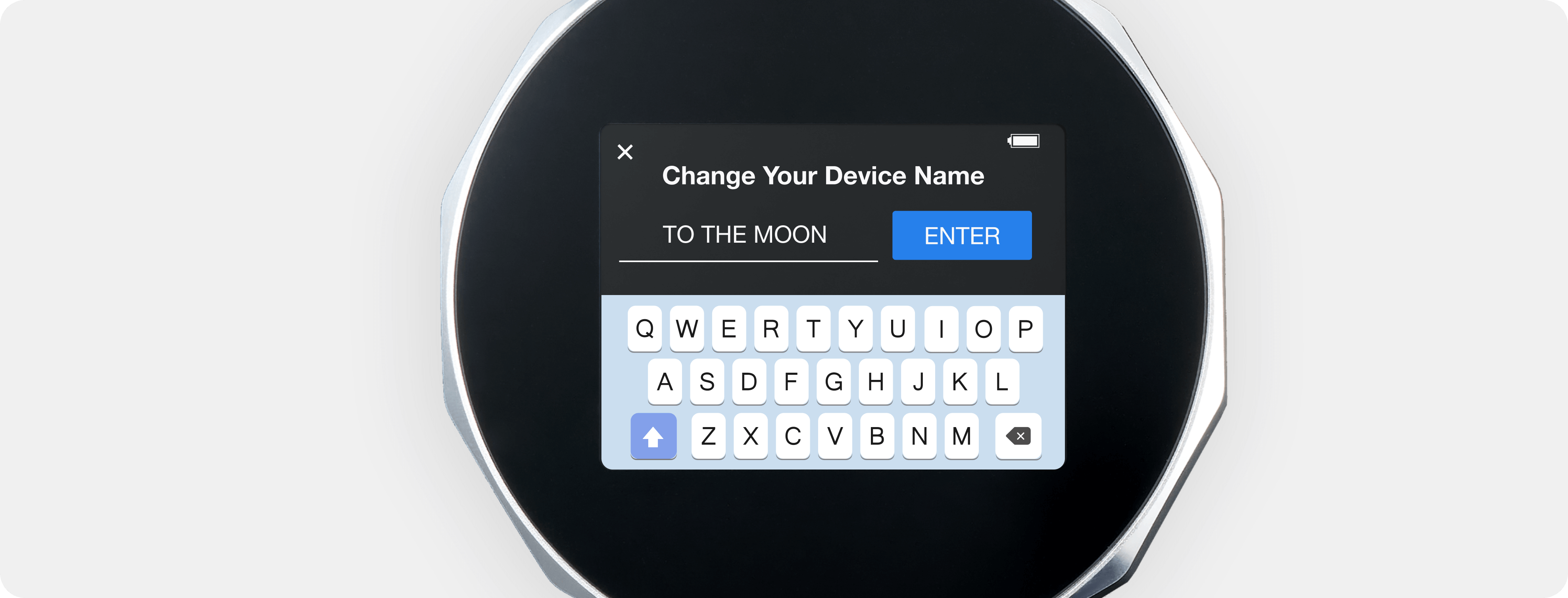
Device-Function-Name


icon_PIN

PIN #

1. You can change your device PIN in the PIN function.

2. Your PIN must be a set of 4-8 digit numbers.

NOTE: When setting your PIN, please avoid using simple number sequences like 1234 or 0000, sequences of repeated numbers like 1122 or 2233, and significant dates such as your birth year or spouse’s birthday.
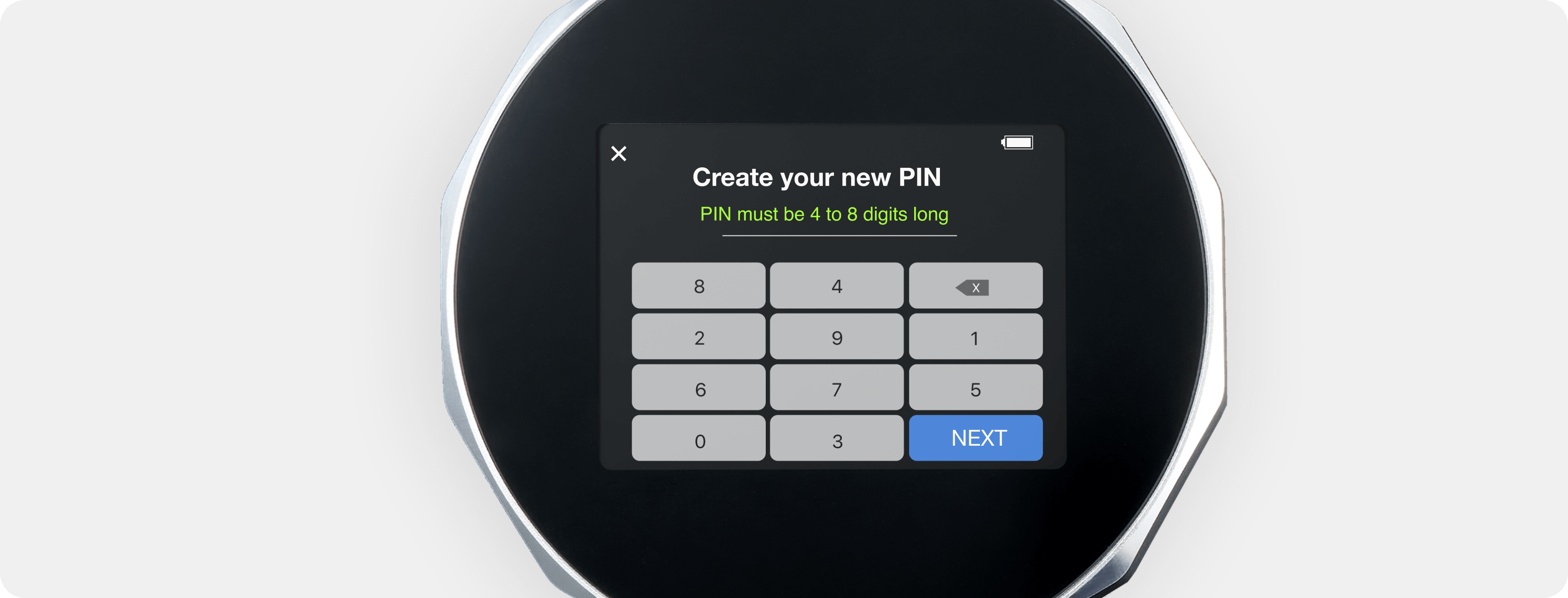
Device-Function-PIN


icon_seed

SEED #

1. You can verify that you’ve correctly saved your recovery seed phrases using the SEED function.

2. Follow the step-by-step guide on how to perform a Recovery Seed Phrase Check.

SEED Check Function


icon_about

About #

1. Firmware Version – current firmware versions of the Secure Element (SE) and the device MCU (micro controller unit) information which you may need for firmware upgrades and technical support.

2. Regulation – FCC and CE regulation-compliant information.

About

new wallet, Setup
What are your Feelings
Share This Article :
  • Facebook
  • Twitter
  • LinkedIn
  • Pinterest
Still stuck? How can we help?

How can we help?

Updated on August 15, 2023
Hidden Wallet

Powered by BetterDocs

Table of Contents
  • Bluetooth
  • Hidden Wallet
  • Reset
  • Lock Timer
  • Name
  • PIN
  • SEED
  • About
SecuX Hardware Wallet

SecuX V20
SecuX W20
SecuX W10
SecuX Nifty
X-SEED Series
Compare Wallets
All Products

Download App
Contact Us
How it works
Blog
Crypto Assets

Payment Solutions

Who we are
Affiliate Partnership
Partners
Become a reseller
News
Media Reviews

Website ToS
Privacy Policy
Application ToS
Shop ToS

    SecuX TwitterSecuX FacebookSecuX InstagramSecuX Telegram

    Products

    SecuX V20

    SecuX W20

    SecuX W10

    SecuX Nifty

    X-SEED Series

    Compare Wallets

    All Products

    Support

    Download App

    Contact Us

    How it works

    Blog

    Crypto Assets

    For Business

    Payment Solutions

    Support

    Download App

    Contact Us

    How it works

    Blog

    Crypto Assets

    For Business

    Payment Solutions

    About

    Who we are

    Affiliate Partnership

    Partners

    Become a reseller

    News

    Media Reviews

    Legal

    Website ToS

    Privacy Policy

    Application ToS

    Shop ToS

    About

    Who we are

    Affiliate Partnership

    Partners

    Become a reseller

    News

    Media Reviews

    Legal

    Website ToS

    Privacy Policy

    Application ToS

    Shop ToS

    SecuX Hardware Wallet

    SecuX TwitterSecuX FacebookSecuX InstagramSecuX Telegram

      SecuX uses cookies to improve your experience. We'll assume you're ok with this, If you agree, welcome to use our website.I agree and close Read Our Policy
      Privacy & Cookies Policy

      Privacy Overview

      This website uses cookies to improve your experience while you navigate through the website. Out of these, the cookies that are categorized as necessary are stored on your browser as they are essential for the working of basic functionalities of the website. We also use third-party cookies that help us analyze and understand how you use this website. These cookies will be stored in your browser only with your consent. You also have the option to opt-out of these cookies. But opting out of some of these cookies may affect your browsing experience.
      Necessary
      Always Enabled
      Necessary cookies are absolutely essential for the website to function properly. These cookies ensure basic functionalities and security features of the website, anonymously.
      CookieDurationDescription
      cookielawinfo-checkbox-analytics11 monthsThis cookie is set by GDPR Cookie Consent plugin. The cookie is used to store the user consent for the cookies in the category "Analytics".
      cookielawinfo-checkbox-functional11 monthsThe cookie is set by GDPR cookie consent to record the user consent for the cookies in the category "Functional".
      cookielawinfo-checkbox-necessary11 monthsThis cookie is set by GDPR Cookie Consent plugin. The cookies is used to store the user consent for the cookies in the category "Necessary".
      cookielawinfo-checkbox-others11 monthsThis cookie is set by GDPR Cookie Consent plugin. The cookie is used to store the user consent for the cookies in the category "Other.
      cookielawinfo-checkbox-performance11 monthsThis cookie is set by GDPR Cookie Consent plugin. The cookie is used to store the user consent for the cookies in the category "Performance".
      viewed_cookie_policy11 monthsThe cookie is set by the GDPR Cookie Consent plugin and is used to store whether or not user has consented to the use of cookies. It does not store any personal data.
      Functional
      Functional cookies help to perform certain functionalities like sharing the content of the website on social media platforms, collect feedbacks, and other third-party features.
      Performance
      Performance cookies are used to understand and analyze the key performance indexes of the website which helps in delivering a better user experience for the visitors.
      Analytics
      Analytical cookies are used to understand how visitors interact with the website. These cookies help provide information on metrics the number of visitors, bounce rate, traffic source, etc.
      Advertisement
      Advertisement cookies are used to provide visitors with relevant ads and marketing campaigns. These cookies track visitors across websites and collect information to provide customized ads.
      Others
      Other uncategorized cookies are those that are being analyzed and have not been classified into a category as yet.
      SAVE & ACCEPT